Microsoft Fabric has been out for a couple of years now. Have you ever wondered what is under the hood? There are lots of interesting things hiding in plain sight. Today, let’s take a look at Project Vegas, the intelligent caching layer for Spark in Synapse and Fabric.
Just like in my previous Fabric under the hood post , a few disclaimers before we dive in:
While, as a Microsoft MVP, I have access to a lot of internal information under NDA, everything shared in this post is based on publicly available information and my own experiments in Fabric. I have never discussed this topic with Microsoft staff, and all information comes from what is available in any Fabric notebook. Every Fabric user can quite easily discover and verify the information shared in this post.
While I did find quite a lot of evidence, this post also contains some speculation. I am quite confident that I got the bigger picture right, but some of the details might be wrong.
I work a lot with the different Fabric runtimes and wanted to better understand how they work. As you probably know, besides Python/PySpark, Scala, SQL, and a few other languages, you can also run plain shell commands in the underlying VM.
Basically, you can use the %%sh magic command to run any bash command in the underlying VM. From there, you can explore all the files and processes running on the VM. You’ll quickly spot the typical Spark components, but some might not look familiar to experienced Spark architects. Those are the interesting ones, as they are probably Microsoft’s secret sauce.

What Vegas solves
Before we look at Vegas itself, let’s first try to understand the problem that Vegas solves.
The Lakehouse disadvantage
These days, we all prefer a lakehouse-based data platform like Fabric, Databricks, or Snowflake. This means that our compute and storage layers are completely decoupled. We can scale them independently of each other and use cheap storage services like Azure Storage. Behind the scenes, OneLake also forms a layer on top of Azure’s Data Lake Storage Gen2 (ADLS).
When you run your data-intensive workloads, the compute nodes have to retrieve the data they need for their transformations. This comes with a performance penalty. In computing, the general rule of thumb is that the closer the data is to your CPU, the better your performance will be. However, in a lakehouse architecture, our data is stored quite far away from the CPU.
In terms of performance from best to worst:
- local CPU cache (a few MBs): for data we are working with right now
- local RAM (a few GBs): for data we are working with in this computation
- local SSD (GBs to TBs): for data we frequently work with in this session
- external HDD (TBs): everything else, including our data stored on OneLake / ADLS
The further your executors have to go for the data they need, the bigger the performance penalty will be.
Caching to the rescue
During a data transformation, your execution engine might need to read the same file multiple times. This is when Vegas becomes interesting.
Vegas is a caching layer sitting in between OneLake/ADLS and Spark. It intercepts all requests to OneLake/ADLS and caches all files locally on the SSD of the executing node.
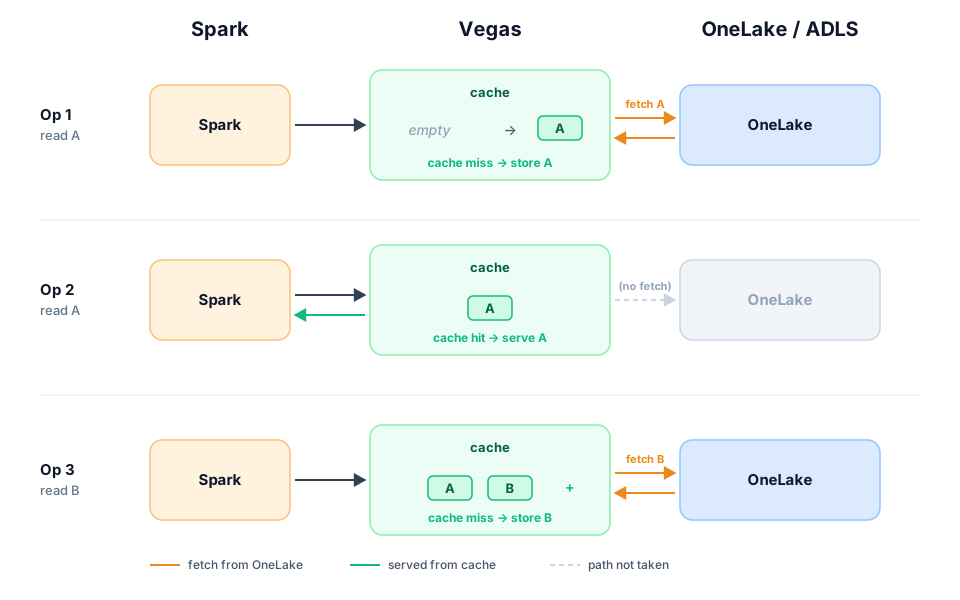
So looking at how Vegas works, one could say: what happens in Vegas, stays in Vegas 😉
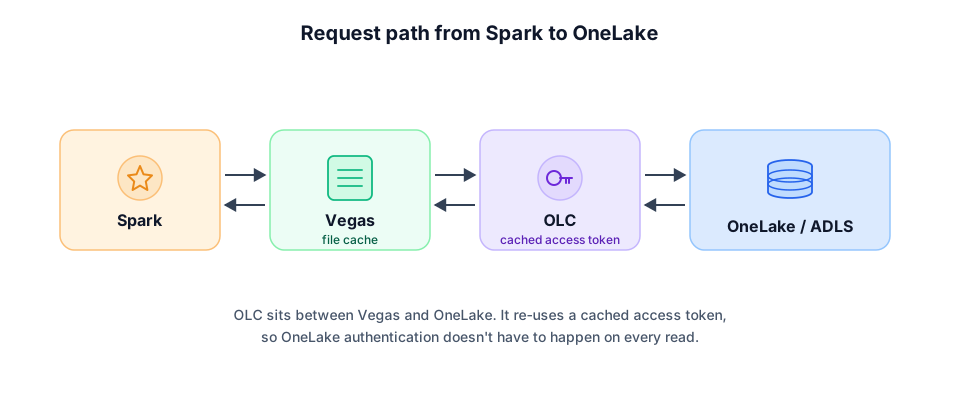
In Fabric, Vegas doesn’t talk to OneLake directly. Between Vegas and OneLake, there’s a component called OLC (OneLake Client) that acts as a proxy between Spark/Vegas and OneLake. OLC is responsible for handling authentication and authorization to OneLake. Otherwise, every request would have to fetch a fresh access token, which would add a lot of overhead.
Traces of Vegas in Microsoft products
There are lots of interesting things you can find about Vegas in your Fabric Runtime, as well as on Microsoft Learn itself.
Vegas is clearly the codename for Microsoft Fabric’s Intelligent Caching Layer , and the same goes for Azure Synapse . When you use an external Hive metastore for Synapse, the Vegas libraries have to be included for Spark in Synapse to read your data. At the time of writing, the table listing key differences between PySpark and Python notebooks in Fabric describes Vegas Cache as an in-memory cache that speeds up repeated Spark data access.
One of the interesting things about libraries used in Spark is that they typically contain lots of metadata about how they were created. If you extract the .jar file containing Vegas, you can find a link to Microsoft’s internal git repository at https://msdata.visualstudio.com/HDInsight/_git/wildfire-data-services, 2019 as the year of its inception, and other details like the address of Microsoft’s internal private Maven feed on Azure DevOps. More details can be found in the /etc/vegas/ directory in your Fabric Runtime. Vegas is also (partially) configured by the Bare-Bones Cluster
we discussed in my previous post.
It’s clear that Vegas was created to speed up reads from ADLS in Azure Synapse Spark, but Microsoft is still continuing its development for Microsoft Fabric.
How it works
Apache Spark is built on top of Apache Hadoop. Since both can run on any kind of storage, Spark inherits Hadoop’s filesystem abstraction layer (HDFS). When you ask Spark to read data from a location, it looks for a filesystem handler. Vegas registers itself as the filesystem handler for abfs(s) in /etc/hadoop/conf/core-site.xml:
1<property>
2  <name>fs.abfs.impl</name>
3  <value>com.microsoft.vegas.vfs.VegasFileSystem</value>
4</property>
5<property>
6  <name>fs.abfss.impl</name>
7  <value>com.microsoft.vegas.vfs.SecureVegasFileSystem</value>
8</property>
These two classes are implementations of the HDFS driver. Since you use abfs(s) URIs to point to ADLS or OneLake, this is how Spark knows when to redirect requests to Vegas. The HDFS driver is documented on Microsoft Learn as well.
Vegas itself seems to be written in C++ (/bin/vegas/vegas) and serves an HTTP API on port 8090. It has two cache subsystems: a VFS cache at /mnt/vegas/vfs where Spark’s Parquet reads land, and a separate cache service at /var/vegas/cache for other internal routes. The Microsoft Learn pages call Vegas an “in-memory” cache, but in practice both subsystems persist to local SSD.
Using and configuring the intelligent caching layer
Configuring the Vegas cache size
While these details are fascinating for a Microsoft geek like myself, let’s look at how you can benefit from Vegas as an end user, and at the features, tweaks, and knobs it offers.
Vegas has over 200 configuration keys. You can configure the most important ones through Spark configuration properties.
1spark.conf.set('spark.synapse.vegas.useCache', True|False) # enable or disable Vegas caching
2spark.conf.set('spark.synapse.vegas.cacheSize', 50) # set the cache size in % of the local SSD disk size
When might you want to change these values? For this, we need to go back to the inner workings of Spark itself.
Spark is a distributed execution engine that runs in a cluster. This cluster consists of one or more nodes. One of those nodes runs the driver, which orchestrates the execution of your Spark job but doesn’t do any of the actual data processing. The data processing is done by the executors, which can run on the same node as the driver but typically run on different nodes. Depending on the size of the nodes in your cluster, you might have more or fewer executors running on each node.
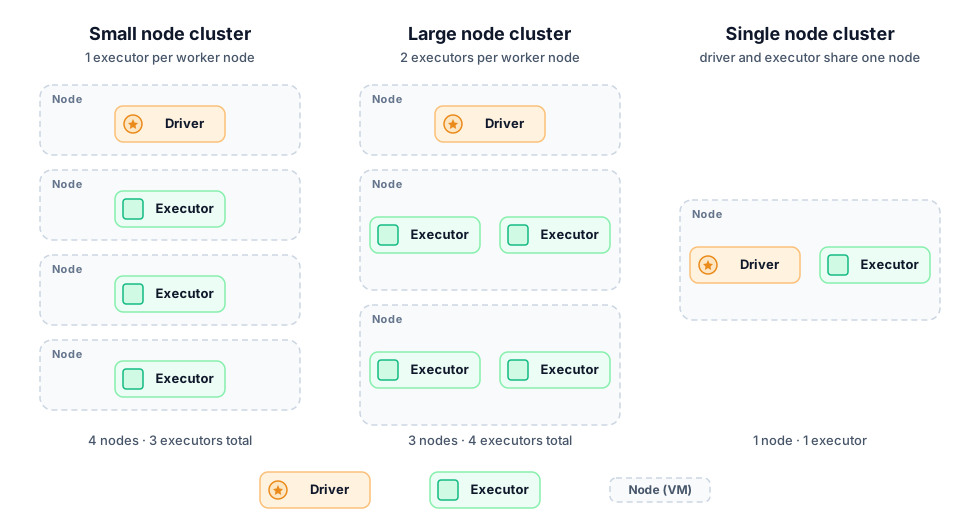
Every node in the diagram above is a regular VM with its own assigned SSD storage. When Vegas is disabled, all of this storage is available to Spark. Spark can use this storage for its shuffle operations.
So, what is a Spark shuffle operation?
Spark works with lazy evaluation. Ideally, you build up your Spark data transformation job and limit the number of actions, or move them to the end of your job. An action typically reads data, runs all transformations, and then either outputs a value (e.g. count() or collect()) or writes data to the filesystem.
Spark distributes your data over its executors and runs the transformations in parallel on all executors. Ideally, you’d partition your data so that each transformation can find what it needs locally on the executor, based on the output of the previous transformation. However, this is not always the case. When data from one transformation needs to be shuffled between executors for the next transformation (typically in joins or aggregations), Spark writes the intermediate data to disk so it can be exchanged between executors. This is called a shuffle operation, and it can be quite expensive in terms of performance. Shuffles are unfortunately very common in poorly written Spark jobs.
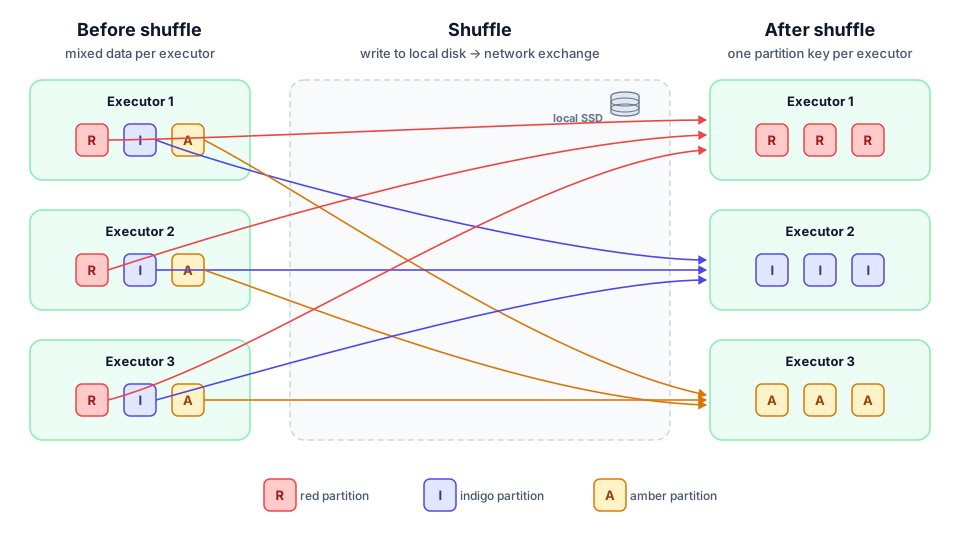
The spark.synapse.vegas.cacheSize value sets what percentage of the local SSD storage on a node (not per executor) Vegas can use for caching. If you have a lot of shuffle operations in your job, you might want to decrease this value to make sure that Vegas doesn’t use up all the local SSD storage and that Spark has enough space left for its shuffle operations. If you have a very well-optimized Spark job with few shuffle operations, you can probably set this value to 80% to get the best performance out of Vegas. In the Synapse version of the documentation, Microsoft writes We reserve a minimum of 20% of available disk space for data shuffles.
Another reason to disable Vegas caching is when your Spark job doesn’t need to read the same data multiple times. In general, the recommendation is to leave Vegas enabled. Microsoft quotes a performance improvement of up to 60% on subsequent reads (Fabric docs; older Synapse docs cite up to 65% for Parquet, 50% for CSV).
Other configuration options
| Config key | Default value | Description |
|---|---|---|
| spark.synapse.vegas.useCache | True | Enable or disable Vegas caching |
| spark.synapse.vegas.cacheSize | 50 | Set the cache size in % of the local SSD disk size |
| spark.hadoop.synapse.vfs.enabled | True | Enable or disable Vegas caching (secondary switch) |
| spark.hadoop.synapse.vfs.enabled.extensions | .parquet | Configure which file types should be cached by Vegas |
| spark.hadoop.synapse.vfs.disabled.extensions | .csv | Configure which file types should not be cached by Vegas |
| spark.synapse.vegas.consistent.hash | True | Unknown (related commit message: “Improved Cache Locality”) |
| spark.synapse.vegas.hash.placement | True | Unknown (related commit message: “Improved Cache Locality”) |
| spark.hadoop.synapse.vfs.debug.log.level | 3 | Controls the logging level. The logs seem to be stored in /var/log/vegas/ |
| spark.synapse.vegas.EnableProgressiveDownload | True | When enabled, Vegas starts downloading files and serves them to Spark in 4 MB chunks. This allows Spark to start processing the file before it’s fully downloaded, which can improve performance for large files. When disabled, Vegas downloads the entire file before serving it to Spark. |
CSV support
What is strange here is that Vegas is disabled for CSV. CSV isn’t all that common in Fabric as most users will use Delta Lake (please stop calling it Delta-Parquet, that is not its real name). And since Delta Lake works with Parquet under the hood, most expensive reads will be Parquet files.
I tried enabling CSV support by changing the spark.hadoop.synapse.vfs.enabled.extensions value, but that didn’t work. This is most likely because of the hardcoded configuration option Vfs.ParquetOnly=true in the Vegas configuration file. There doesn’t seem to be a way to change this value without restarting the Vegas service, which we cannot do in Fabric.
Vegas for Pandas, Polars, DuckDB, and more?
Vegas is an HDFS handler. Microsoft does not offer Vegas for engines other than Spark. If you use Sempy, only the functions returning Spark DataFrames will benefit from Vegas caching.
My thinking was: Apache Arrow has HDFS support and Vegas is the registered HDFS handler for abfs(s) in the Fabric runtime, so maybe PyArrow can use Vegas caching for its HDFS reads. If that were the case, then every Python library that uses Arrow’s filesystem layer (Polars, DuckDB via Arrow, Pandas with engine="pyarrow") would also benefit from Vegas caching. That would be a great bonus for Python users in Fabric. But unfortunately, that is not the case. PyArrow’s HDFS support relies on libhdfs.so, a native library that Microsoft does not ship in the runtime. Without that library, PyArrow cannot use the HDFS driver and therefore cannot benefit from Vegas caching.
Interesting finds about future capabilities
Mison
In the configuration options, we see that the Mison feature is currently disabled. This probably refers to the Mison research project , a fast JSON parser for data analytics workloads. There does not seem to be a way to enable this feature as this would involve restarting the Vegas service but keeping our configuration intact.
FPGA support (hardware acceleration)
The configuration file has references to FPGA support. This could indicate that Microsoft is looking into hardware acceleration for Vegas in the future. That would be quite interesting, as it could offer even better performance for data-intensive workloads. We can even see a direct reference to the Xilinx U250
(PCIe Gen3 x16, XDMA 2.1) in the configuration option FpgaSvc.XclBinName. The current status of FPGA acceleration is also exposed in the HTTP API mentioned above. When I call the API’s ping endpoint (http://localhost:8090/cache/ops/ping), I get the following response:
1{
2   "VegasCache" :  "3.5.10",
3   "VersionComment" : "30-Sep-2025 Strawberries SP5",
4   "SecondsAlive" : "2714",
5   "FPGAStatus" : "NotFoundXilinxDevice"
6}
These kinds of accelerators can offload some of the data processing tasks from the CPU, which can lead to significant performance improvements (AMD claims up to 90x faster, depending on the workload). Now the question is: how could a caching layer benefit from FPGA acceleration? Or are they working on something else which we have yet to uncover?
Conclusion
Vegas is one of the Synapse components that made its way into Fabric and an impressive piece of software engineering, benefiting Fabric users without them even realizing it. It is a great example of how Microsoft is leveraging its existing technologies and expertise to build a powerful data platform.
Vegas is also still being actively developed and multiple configuration options hint at features that are not yet available. It will be interesting to see how Vegas evolves in the future and what new capabilities Microsoft will add to it. I’m definitely keeping an eye on:
- Vegas CSV support, which would be a nice bonus for users who still have to work with CSV files in their data platform. Since the automatic Shortcut Transforms are also using Spark under the hood, this might also speed up those Shortcuts.
- Vegas Mison support, which could speed up JSON parsing in Fabric. Same remarks as for CSV support, this could also speed up Shortcut Transforms that work with JSON files.
- FPGA acceleration. Still unclear if/how Microsoft plans to use this.