Today I’m introducing a new side project that I’ve been working on: the Fabric Data Warehouse CLI and MCP Server . This tool is designed to simplify the management and interaction with Microsoft Fabric’s Data Warehouse and SQL Endpoints.

While Microsoft already provided the great Fabric CLI and Fabric MCP Server , I found that they don’t have a lot of features related to the Data Warehouse and SQL Endpoints. They typically only allow you to create or delete them, not to do anything with them. So I decided to create a new CLI and MCP Server that focuses on these areas.
This tool is really meant for the SQL-first developers, data engineers, analytics engineers, and data analysts who want to interact with the Fabric Data Warehouse and SQL Endpoints. I built it in the way that I would want to use it myself, and I hope it will be useful for others as well.
Features at a glance
All the features are explained in detail in the documentation , but here are a few highlights of what you can do with this tool.
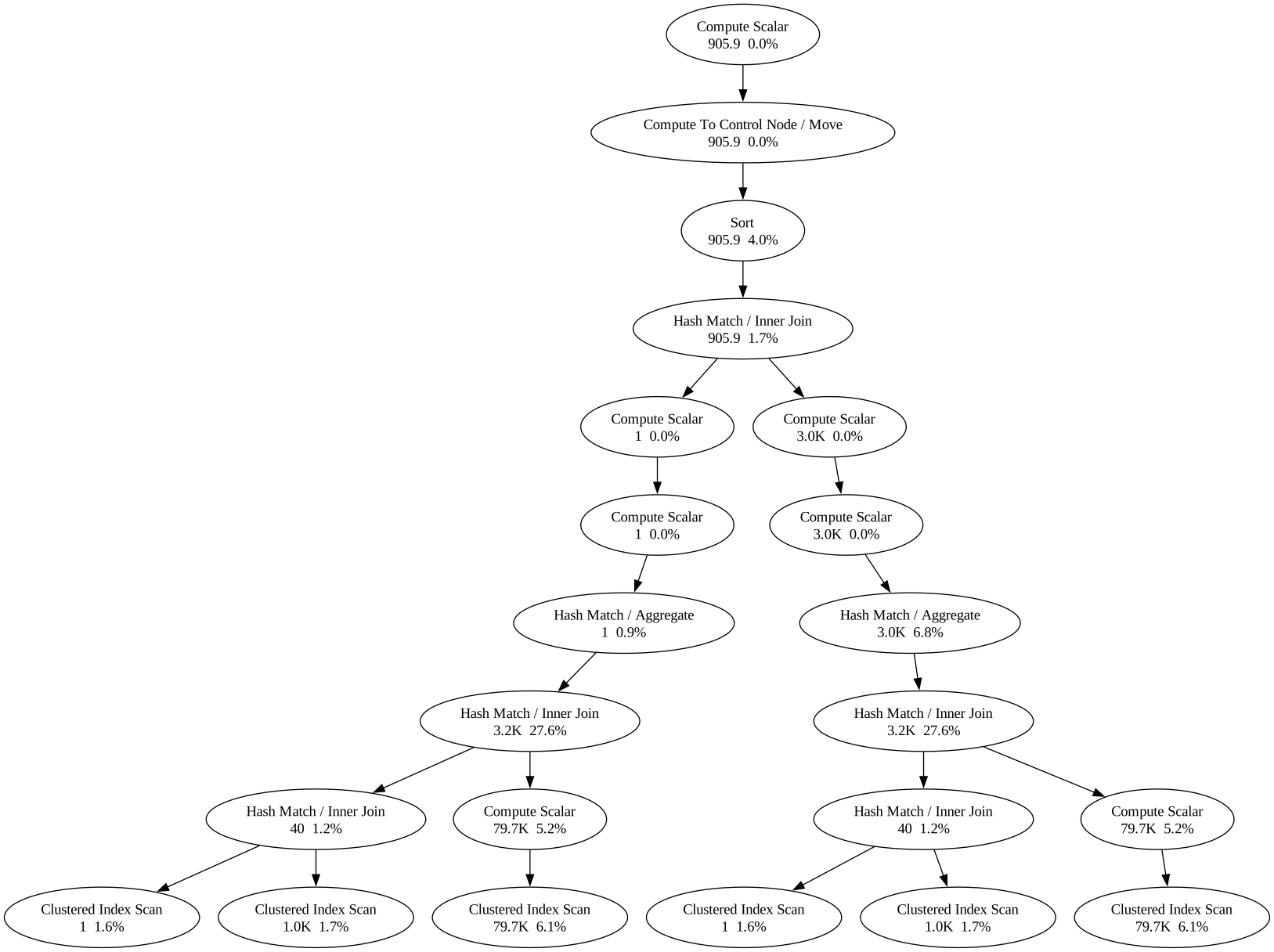
Run queries and inspect query plans
Of course you can run actual SQL queries against the Data Warehouse and SQL Endpoints with this. This was the main reason why I created it in the first place. But even nicer - especially for all of us not wanting to use Windows and SSMS - is that you can also analyze and visualize the query plans:
1> fdw sql exec -q "select 'hello world' as from_the_cli"
2SQL Result
3┏━━━━━━━━━━━━━━┓
4┃ from_the_cli ┃
5┡━━━━━━━━━━━━━━┩
6│ hello world  │
7└──────────────┘
 1> fdw sql plan -f query.sql
 2
 3Statement 1: -- TPC-H Q11: Important Stock Identification (NATION = GERMANY, FRACTION = 0.0001)
 4SELECT
 5    ps_partkey,
 6    SUM(ps_supplycost * ps_availqty) AS value
 7FROM partsupp, supplier, nation
 8WHERE ps_suppkey = s_suppkey
 9  AND s_nationkey = n_nationkey
10  AND n_name = 'GERMANY'
11GROUP BY ps_partkey
12HAVING SUM(ps_supplycost * ps_availqty) > (
13        SELECT SUM(ps_supplycost * ps_availqty) * 0.0001
14        FROM partsupp, supplier, nation
15        WHERE ps_suppkey = s_suppkey
16          AND s_nationkey = n_nationkey
17          AND n_name = 'GERMANY'
18      )
19ORDER BY value DESC
20Compute Scalar  905.9  0.0%
21└── Compute To Control Node  (Move)  905.9  0.0%
22    └── Sort  905.9  4.0%
23        └── Hash Match  (Inner Join)  905.9  1.7%
24            ├── Compute Scalar  1  0.0%
25            │   └── Compute Scalar  1  0.0%
26            │       └── Hash Match  (Aggregate)  1  0.9%
27            │           └── Hash Match  (Inner Join)  3.2K  27.7%
28            │               ├── Hash Match  (Inner Join)  40  1.2%
29            │               │   ├── Clustered Index Scan  1  1.6%
30            │               │   └── Clustered Index Scan  1.0K  1.7%
31            │               └── Compute Scalar  79.9K  5.2%
32            │                   └── Clustered Index Scan  79.9K  6.1%
33            └── Compute Scalar  3.0K  0.0%
34                └── Compute Scalar  3.0K  0.0%
35                    └── Hash Match  (Aggregate)  3.0K  6.8%
36                        └── Hash Match  (Inner Join)  3.2K  27.5%
37                            ├── Hash Match  (Inner Join)  40  1.2%
38                            │   ├── Clustered Index Scan  1  1.6%
39                            │   └── Clustered Index Scan  1.0K  1.7%
40                            └── Compute Scalar  79.4K  5.2%
41                                └── Clustered Index Scan  79.4K  6.0%
Or you can even export to SVG or HTML:
1> fdw sql plan -f query.sql --format svg -o plan.svg
Analyze query performance and execution history
You can also inspect the history and performance of your queries. Same for connections and sessions, which can even be killed from the CLI.
I loaded the TPC-H benchmark into a warehouse and ran a handful of its queries a few times over. fdw queries frequent then ranks them by how often they run and shows timing stats for each. The classic TPC-H Q1 pricing-summary report comes out on top:
 1> fdw queries frequent tpch
 2
 3╭──────────────────────────────────────────────────────────────────╮
 4│ last_run_command: SELECT l_returnflag, l_linestatus,             │
 5│   SUM(l_quantity) AS sum_qty, SUM(l_extendedprice) AS            │
 6│   sum_base_price, SUM(l_extendedprice * (1 - l_discount)) AS     │
 7│   sum_disc_price, ... FROM lineitem WHERE l_shipdate <=          │
 8│   DATEADD(day, -90, CAST('1998-12-01' AS date)) GROUP BY         │
 9│   l_returnflag, l_linestatus ORDER BY l_returnflag, l_linestatus │
10│ number_of_runs: 9                                                │
11│ avg_total_elapsed_time_ms: 152                                   │
12│ min_run_total_elapsed_time_ms: 117                               │
13│ max_run_total_elapsed_time_ms: 231                               │
14│ number_of_successful_runs: 9                                     │
15│ query_hash: 0x956ED9423EC8FFEC                                   │
16╰──────────────────────────────────────────────────────────────────╯
Further down the same list, the heavier Q13 customer-distribution query shows the spread between a warm run and a cold one:
 1╭───────────────────────────────────────────────────────────────────╮
 2│ last_run_command: SELECT c_count, COUNT_BIG(*) AS custdist FROM ( │
 3│   SELECT c_custkey, COUNT(o_orderkey) AS c_count FROM customer    │
 4│   LEFT OUTER JOIN orders ON c_custkey = o_custkey AND o_comment   │
 5│   NOT LIKE '%special%requests%' GROUP BY c_custkey ) AS c_orders  │
 6│   GROUP BY c_count ORDER BY custdist DESC, c_count DESC           │
 7│ number_of_runs: 6                                                 │
 8│ avg_total_elapsed_time_ms: 332                                    │
 9│ min_run_total_elapsed_time_ms: 155                                │
10│ max_run_total_elapsed_time_ms: 1053                               │
11│ number_of_successful_runs: 6                                      │
12│ query_hash: 0x7EBC641403A95608                                    │
13╰───────────────────────────────────────────────────────────────────╯
fdw queries long-running ranks by elapsed time instead, fdw queries history and fdw queries sessions give you the full execution history, and fdw queries connections lists the open connections. Pair fdw queries running with fdw queries kill <session-id> and you have a tiny mission control center for your data warehouse.
Once you know which queries matter, the next step is optimizing their performance. Two of the biggest levers are clustering and statistics, which are also completely covered by the CLI and MCP server.
With fdw tables cluster-by you can set the clustering columns of a table. Since Fabric doesn’t allow you to change these after creation, this will recreate the table for you (this will also drop statistics unfortunately).
 1> fdw tables cluster-by wh_reporting dbo.campaign_performance --cluster-by campaign_date
 2
 3WARNING: Dependent views and stored procedures referencing this table are NOT automatically updated by this CLUSTER BY rebuild (CTAS-swap) and may need refreshing.
 4╭──────────────────────────────────────────╮
 5│ schema_name: dbo                         │
 6│ name: campaign_performance               │
 7│ qualified_name: dbo.campaign_performance │
 8│ created: 2026-06-27T23:38:37.073000      │
 9│ modified: 2026-06-27T23:38:40.973000     │
10╰──────────────────────────────────────────╯
fdw tables cluster-columns reads the clustering back so you can confirm it landed:
1> fdw tables cluster-columns wh_reporting dbo.campaign_performance
2
3Cluster Columns
4┏━━━━━━━━━━━━━━━┳━━━━━━━━━━━━━━━━━━━━┓
5┃ column_name   ┃ clustering_ordinal ┃
6┡━━━━━━━━━━━━━━━╇━━━━━━━━━━━━━━━━━━━━┩
7│ campaign_date │ 1                  │
8└───────────────┴────────────────────┘
With the table settled, statistics give the optimizer the information it needs to build good query plans. Fabric creates some automatically, and fdw statistics list shows them all, but you can add your own. Fabric only supports single-column statistics, so fdw statistics create takes one column:
 1> fdw statistics create wh_reporting --table dbo.campaign_performance --column channel --name stat_cp_channel
 2
 3╭───────────────────────────────────────────╮
 4│ name: stat_cp_channel                     │
 5│ qualified_table: dbo.campaign_performance │
 6│ column: channel                           │
 7│ auto_created: False                       │
 8│ user_created: True                        │
 9│ last_updated: 2026-06-27T23:41:59.250000Z │
10╰───────────────────────────────────────────╯
fdw statistics show let’s you see exactly what the optimizer sees: the header, the density vector, and the histogram. The histogram renders each step with an inline bar chart. My synthetic data splits evenly across five channels at 210 rows each, and the EQ bar column says so with five identical full bars, while the Range bar column stays empty because every gap between the channel values holds zero rows:
 1> fdw statistics show wh_reporting dbo.campaign_performance stat_cp_channel
 2
 3╭──────────────────────────────────────────────────── Stat Header ─────────────────────────────────────────────────────╮
 4│ name: stat_cp_channel                                                                                                │
 5│ updated: NULL                                                                                                        │
 6│ rows: 1050                                                                                                           │
 7│ rows_sampled: 1050                                                                                                   │
 8│ steps: 5                                                                                                             │
 9│ density: 0.004761904943734407                                                                                        │
10│ average_key_length: 6.599999904632568                                                                                │
11│ string_index: NO                                                                                                     │
12│ filter_expression: NULL                                                                                              │
13│ unfiltered_rows: 1050                                                                                                │
14╰──────────────────────────────────────────────────────────────────────────────────────────────────────────────────────╯
15Density Vector
16┏━━━━━━━━━━━━━━━━━━━━━┳━━━━━━━━━━━━━━━━━━━┳━━━━━━━━━┓
17┃ all_density         ┃ average_length    ┃ columns ┃
18┡━━━━━━━━━━━━━━━━━━━━━╇━━━━━━━━━━━━━━━━━━━╇━━━━━━━━━┩
19│ 0.20000000298023224 │ 6.599999904632568 │ channel │
20└─────────────────────┴───────────────────┴─────────┘
21                                               Histogram
22┏━━━━━━━━━━━━━━┳━━━━━━━━━━━━┳━━━━━━━━━┳━━━━━━━━━━━━━━━━━━━━━┳━━━━━━━━━━━━━━━━┳━━━━━━━━━━━━┳━━━━━━━━━━━┓
23┃ RANGE_HI_KEY ┃ RANGE_ROWS ┃ EQ_ROWS ┃ DISTINCT_RANGE_ROWS ┃ AVG_RANGE_ROWS ┃ EQ bar     ┃ Range bar ┃
24┡━━━━━━━━━━━━━━╇━━━━━━━━━━━━╇━━━━━━━━━╇━━━━━━━━━━━━━━━━━━━━━╇━━━━━━━━━━━━━━━━╇━━━━━━━━━━━━╇━━━━━━━━━━━┩
25│ Affiliate    │          0 │     210 │                   0 │              1 │ ██████████ │           │
26│ Display      │          0 │     210 │                   0 │              1 │ ██████████ │           │
27│ Email        │          0 │     210 │                   0 │              1 │ ██████████ │           │
28│ Search       │          0 │     210 │                   0 │              1 │ ██████████ │           │
29│ Social       │          0 │     210 │                   0 │              1 │ ██████████ │           │
30└──────────────┴────────────┴─────────┴─────────────────────┴────────────────┴────────────┴───────────┘
fdw statistics update refreshes a statistic after a big load, and fdw statistics delete removes one you no longer need.
Optimize SQL Pools
Fabric recently introduced custom SQL Pools so you can split a workspace’s compute into named pools and route queries to them with classifiers. The tool has everything which is currently available: create, read, update, delete.
A workspace starts with custom pools switched off. fdw sql-pools status reports just that on/off flag:
1> fdw sql-pools status
2
3╭──────────────────────────────╮
4│ customSQLPoolsEnabled: False │
5╰──────────────────────────────╯
Defining a pool is one command. Here I add a read-optimised reporting pool, capped at 60% of the workspace compute and marked as the default, that catches my BI traffic by application name, plus a smaller write-leaning etl pool for the dbt loads:
1> fdw sql-pools create --name reporting --max-percent 60 --default \
2    --optimize-for-reads --classifier-type "Application Name" \
3    --classifier-value "Power BI" --classifier-value "Tableau"
4
5> fdw sql-pools create --name etl --max-percent 40 --no-default \
6    --no-optimize-for-reads --classifier-type "Application Name" \
7    --classifier-value "dbt"
NB: these are just examples, they’re probably not the right classifiers for your traffic.
Pools stay inert until you flip the workspace switch, and the switch refuses to turn on until at least one pool exists:
1> fdw sql-pools enable
After that the switch is on, which fdw sql-pools status confirms:
1> fdw sql-pools status
2
3╭─────────────────────────────╮
4│ customSQLPoolsEnabled: True │
5╰─────────────────────────────╯
status deliberately reports nothing but that flag. To see the pools themselves, fdw sql-pools list gives the overview and fdw sql-pools show drills into one:
 1> fdw sql-pools list
 2
 3┏━━━━━━━━━━━┳━━━━━━━━━━━┳━━━━━━━━━━━━━━━━━━━━━━━┳━━━━━━━━━━━━━━━━━━┳━━━━━━━━━━━━━━━━━━━━━━━┓
 4┃ name      ┃ isDefault ┃ maxResourcePercentage ┃ optimizeForReads ┃ classifier            ┃
 5┡━━━━━━━━━━━╇━━━━━━━━━━━╇━━━━━━━━━━━━━━━━━━━━━━━╇━━━━━━━━━━━━━━━━━━╇━━━━━━━━━━━━━━━━━━━━━━━┩
 6│ reporting │ True      │ 60                    │ True             │ {'type': 'Application │
 7│           │           │                       │                  │ Name', 'value':       │
 8│           │           │                       │                  │ ['Power BI',          │
 9│           │           │                       │                  │ 'Tableau']}           │
10│ etl       │ False     │ 40                    │ False            │ {'type': 'Application │
11│           │           │                       │                  │ Name', 'value':       │
12│           │           │                       │                  │ ['dbt']}              │
13└───────────┴───────────┴───────────────────────┴──────────────────┴───────────────────────┘
14
15> fdw sql-pools show --name reporting
16
17╭───────────────────────────╮
18│ name: reporting           │
19│ isDefault: True           │
20│ maxResourcePercentage: 60 │
21│ optimizeForReads: True    │
22│ classifier:               │
23│   type: Application Name  │
24│   value:                  │
25│     Power BI              │
26│     Tableau               │
27╰───────────────────────────╯
Every command takes a global --json flag for piping the output into jq or a script instead of reading a table. The classifier that wraps across lines in the table above comes back as a clean nested object:
 1> fdw --json sql-pools list
 2
 3[
 4  {
 5    "name": "reporting",
 6    "isDefault": true,
 7    "maxResourcePercentage": 60,
 8    "optimizeForReads": true,
 9    "classifier": {
10      "type": "Application Name",
11      "value": [
12        "Power BI",
13        "Tableau"
14      ]
15    }
16  },
17  {
18    "name": "etl",
19    "isDefault": false,
20    "maxResourcePercentage": 40,
21    "optimizeForReads": false,
22    "classifier": {
23      "type": "Application Name",
24      "value": [
25        "dbt"
26      ]
27    }
28  }
29]
This JSON output is available on every command.
The CLI and MCP also offer fdw sql-pools insights to understand how you can optimize your SQL Pools.
Manage Data Warehouse and SQL Endpoints
Creating, listing, renaming and dropping warehouses is all here as well. So is everything around them: SQL Endpoints, server-side settings like collation and result-set caching, permissions, restore points, snapshots and audit.
Spinning up a warehouse is a one-liner. Fabric defaults every new warehouse to the case-sensitive Latin1_General_100_BIN2_UTF8 collation (unless you configured your Workspace differently, which you can also do with the CLI/MCP), but you can opt into the case-insensitive one at creation time and the response hands you the connection string straight away:
 1> fdw warehouses create wh_reporting \
 2    --collation Latin1_General_100_CI_AS_KS_WS_SC_UTF8 \
 3    --description "Case-insensitive reporting warehouse"
 4
 5╭──────────────────────────────────────────────────────────────╮
 6│ id: eaf973a4-b82a-4dac-b54e-e1a5cbaf0226                     │
 7│ displayName: wh_reporting                                    │
 8│ description: Case-insensitive reporting warehouse            │
 9│ kind: Warehouse                                              │
10│ connectionString: ...-....datawarehouse.fabric.microsoft.com │
11│ defaultCollation: Latin1_General_100_CI_AS_KS_WS_SC_UTF8     │
12╰──────────────────────────────────────────────────────────────╯
You can of course also get that connection string later on as well with fdw warehouses get wh_reporting.
1> fdw warehouses list
2
3╭────────────────────────────────────────────────╮
4│ id: 23584296-7c63-4b9f-b169-1fc900457c39        │
5│ displayName: lh_marketing                       │
6│ kind: SQLEndpoint                               │
7│ defaultCollation: Latin1_General_100_BIN2_UTF8  │
8╰────────────────────────────────────────────────╯
9...
Need a point-in-time copy or a safety net before a big change? fdw snapshots create and fdw restore-points create have you covered.
Did you notice how I never had to give it a Workspace name? You can set defaults for both the Workspace and the Warehouse/SQL Endpoint so that you don’t have to type them every time.
Create and manage schemas, tables, views, stored procedures, functions, and more
Every Warehouse/Endpoint object can be fully managed with this tool and there are some extra features in store for the tables: create, clone, re-cluster, rename, drop, inspect, count and health-check. Views, stored procedures, functions, schemas and statistics get the same create-and-manage treatment.
 1> fdw tables list lh_marketing
 2
 3Tables
 4┏━━━━━━━━━━━━━┳━━━━━━━━━━━━━━━━━━━━━━━━┓
 5┃ schema_name ┃ name                   ┃
 6┡━━━━━━━━━━━━━╇━━━━━━━━━━━━━━━━━━━━━━━━┩
 7│ dbo         │ ad_impressions         │
 8│ dbo         │ app_logs               │
 9│ dbo         │ clickstream_events     │
10│ dbo         │ devices                │
11│ dbo         │ fitness_activities     │
12│ dbo         │ iot_sensor_readings    │
13│ dbo         │ taxi_trips             │
14│ dbo         │ transactions           │
15│ dbo         │ user_profiles          │
16│ dbo         │ weather_observations   │
17└─────────────┴────────────────────────┘
Inspecting a single table is just as quick:
 1> fdw tables columns lh_marketing dbo.taxi_trips
 2
 3Columns
 4┏━━━━━━━━━┳━━━━━━━━━━━━━━━━━┳━━━━━━━━━━━━━━┓
 5┃ ordinal ┃ name            ┃ data_type    ┃
 6┡━━━━━━━━━╇━━━━━━━━━━━━━━━━━╇━━━━━━━━━━━━━━┩
 7│ 1       │ trip_id         │ BIGINT       │
 8│ 2       │ vehicle_id      │ INT          │
 9│ 3       │ pickup_ts       │ DATETIME2(6) │
10│ 4       │ dropoff_ts      │ DATETIME2(6) │
11│ 5       │ distance_km     │ FLOAT        │
12│ ...     │ ...             │ ...          │
13└─────────┴─────────────────┴──────────────┘
14
15> fdw tables count lh_marketing dbo.taxi_trips
16row_count: 1000000
Creating objects is just as quick. List the columns inline and the tool executes the CREATE TABLE for you:
 1> fdw tables create wh_reporting --name dbo.campaigns \
 2    --column "campaign_id:BIGINT:notnull" \
 3    --column "name:VARCHAR(200):notnull" \
 4    --column "channel:VARCHAR(50)" \
 5    --column "budget_eur:DECIMAL(12,2)" \
 6    --column "start_date:DATE" \
 7    --column "is_active:BIT"
 8
 9╭───────────────────────────────╮
10│ schema_name: dbo              │
11│ name: campaigns               │
12│ qualified_name: dbo.campaigns │
13╰───────────────────────────────╯
Views are a single command too. Pass the SELECT body, the tool validates it, wraps it in a CREATE VIEW and echoes the stored definition back:
 1> fdw views create wh_reporting --name dbo.active_campaigns \
 2    --select "SELECT campaign_id, name, channel, budget_eur FROM dbo.campaigns WHERE is_active = 1"
 3
 4╭─────────────────────────────────────────────────────────────╮
 5│ schema_name: dbo                                            │
 6│ name: active_campaigns                                      │
 7│ qualified_name: dbo.active_campaigns                        │
 8│ definition: CREATE VIEW [dbo].[active_campaigns] AS SELECT  │
 9│   campaign_id, name, channel, budget_eur FROM dbo.campaigns │
10│   WHERE is_active = 1                                       │
11╰─────────────────────────────────────────────────────────────╯
Scaffold a ready-to-go dbt project
If you use dbt, fdw dbt init gives you a complete dbt-fabric project linked to your warehouse in one go. It writes dbt_project.yml, a profiles.yml with the right adapter, host and database already filled in, requirements.txt, the standard dbt folders, a sample model, and a _sources.yml derived from your actual schemas and tables. It even runs git init for you.
1> fdw dbt init lh_marketing ./marketing_dw --project-name marketing_dw
2
3Scaffolded dbt project 'marketing_dw' in ./marketing_dw
4  Host:     ...-....datawarehouse.fabric.microsoft.com
5  Database: lh_marketing
6  Auth:     auto
7  Files written: 20
8  Run dbt from the project folder (or set DBT_PROFILES_DIR).
The generated profiles.yml is ready to use, no hand-editing of connection details required:
 1marketing_dw:
 2  target: dev
 3  outputs:
 4    dev:
 5      type: fabric
 6      driver: ODBC Driver 18 for SQL Server
 7      host: ...-....datawarehouse.fabric.microsoft.com
 8      database: lh_marketing
 9      schema: dbo
10      threads: 4
11      authentication: auto
Ingest data from various sources into the Data Warehouse
Loading data is a single command that drives COPY INTO under the hood. You can load CSV, JSON or Parquet, either from a local file or straight from a remote URL. Local files are staged to a temporary Lakehouse in OneLake and cleaned up automatically afterwards, and with --create the target table is auto-created from the source schema.
To show it end to end, I generated a small Parquet file of campaign performance, 1,050 rows of daily channel metrics, and loaded it with --create:
1> fdw tables load wh_reporting dbo.campaign_performance --file campaign_performance.parquet --create
2
3Loaded 1050 row(s) into [dbo].[campaign_performance].
Because I passed --create, the schema was inferred straight from the Parquet file, no DDL required:
 1> fdw tables columns wh_reporting dbo.campaign_performance
 2
 3Columns
 4┏━━━━━━━━━┳━━━━━━━━━━━━━━━┳━━━━━━━━━━━━━━━┳━━━━━━━━━━┳━━━━━━━━━━━━━━━━━┳━━━━━━━━━━━━━┳━━━━━━━━━━━━━┓
 5┃ ordinal ┃ name          ┃ data_type     ┃ nullable ┃ collation_name  ┃ is_identity ┃ is_computed ┃
 6┡━━━━━━━━━╇━━━━━━━━━━━━━━━╇━━━━━━━━━━━━━━━╇━━━━━━━━━━╇━━━━━━━━━━━━━━━━━╇━━━━━━━━━━━━━╇━━━━━━━━━━━━━┩
 7│ 1       │ campaign_id   │ BIGINT        │ True     │ NULL            │ False       │ False       │
 8│ 2       │ campaign_date │ DATE          │ True     │ NULL            │ False       │ False       │
 9│ 3       │ channel       │ VARCHAR(8000) │ True     │ Latin1_General… │ False       │ False       │
10│ 4       │ region        │ VARCHAR(8000) │ True     │ Latin1_General… │ False       │ False       │
11│ 5       │ impressions   │ BIGINT        │ True     │ NULL            │ False       │ False       │
12│ 6       │ clicks        │ BIGINT        │ True     │ NULL            │ False       │ False       │
13│ 7       │ spend_eur     │ FLOAT         │ True     │ NULL            │ False       │ False       │
14└─────────┴───────────────┴───────────────┴──────────┴─────────────────┴─────────────┴─────────────┘
And the data is queryable right away:
 1> fdw sql exec wh_reporting -q "SELECT TOP (5) channel, SUM(clicks) AS clicks, CAST(SUM(spend_eur) AS DECIMAL(12,2)) AS spend_eur FROM dbo.campaign_performance GROUP BY channel ORDER BY clicks DESC"
 2
 3SQL Result
 4┏━━━━━━━━━━━┳━━━━━━━━┳━━━━━━━━━━━┓
 5┃ channel   ┃ clicks ┃ spend_eur ┃
 6┡━━━━━━━━━━━╇━━━━━━━━╇━━━━━━━━━━━┩
 7│ Search    │ 115449 │ 55882.65  │
 8│ Email     │ 114963 │ 54645.90  │
 9│ Affiliate │ 114627 │ 57233.40  │
10│ Social    │ 113772 │ 58762.35  │
11│ Display   │ 113022 │ 55127.85  │
12└───────────┴────────┴───────────┘
Loading from a remote URL is the same command with --url instead of --file. Secured URLs are handled too, with --credential-type covering SAS tokens, managed identities, service principals and account keys, and --if-exists lets you choose between appending, truncating or replacing an existing table:
1> fdw tables load wh_reporting dbo.campaign_performance --url https://example.com/campaigns.parquet --format parquet --if-exists append
Bonus: get started with the agent skills
The repository is also a Claude Plugin and comes with 3 ready-to-use agent skills:
query-optimizer: analyze query plans, provides suggestions on clusterization and statisticswarehouse-performance: finds long running queries, checks statistics, sql pool insights and configuration, and provides suggestions on how to improve performancedbt-setup: scaffolds a ready-to-go dbt project with the correct configuration for the Data Warehouse and SQL Endpoints
The skills can also be installed directly in any other agentic AI tool.
Installation and documentation
The CLI is on PyPI, so you can install it with pip install fabric-dw or run it without installing anything through uvx fabric-dw. Both fabric-dw and the shorter fdw alias point at the same entry point.
Running it as an MCP server is a one-liner in your client configuration:
1{
2  "mcpServers": {
3    "fabric-dw": {
4      "command": "uvx",
5      "args": ["--from", "fabric-dw@latest", "fabric-dw-mcp"]
6    }
7  }
8}
There’s also a Docker image at ghcr.io/sdebruyn/fabric-dw whose default entrypoint is the MCP server. Authentication goes through azure-identity’s DefaultAzureCredential, so an az login is usually all you need to get started, and you can set FABRIC_AUTH if you’d rather use a service principal or an interactive login.
The full documentation lives at fdw.debruyn.dev .
Open-source, free to use, and complete parity between CLI and MCP Server
This project is open-source (MIT licensed) and free to use. You can find the source code on GitHub . Are you missing any functionalities or ran into a bug? Please open an issue on GitHub, and I’ll do my best to address it.
All features are available in both the CLI and MCP Server, so you can choose the one that best fits your workflow. Sometimes a certain feature will have more options in the CLI. E.g. the query plan functionality will not generate SVG files in the MCP Server, but it will in the CLI as an AI agent will only require the query plan in JSON format to analyze it.
I believe that by bringing all of these features close to agentic AI, we can greatly improve the productivity of everyone working with Microsoft Fabric’s Data Warehouse and SQL Endpoints.
Some more details:
- about 95% test coverage
- close to 5000 unit tests
- integration test suite running against a real Microsoft Fabric environment
- tests run against both Data Warehouse and SQL Endpoints
- over 200 integration tests
- written in Python with the latest standards and best practices
What’s next?
I’m definitely going to use this tool myself daily, and I hope it will be useful for others as well. I plan to continue improving it and adding new features based on user feedback. If you have any suggestions or feature requests, please let me know by opening an issue on GitHub.