A single Fabric Capacity is easy to set up. But what about the risk of a single user taking down your entire data estate with a poorly written query? In this session, we’ll explore how to split and configure Fabric Capacities for different workloads. Autoscaling, pausing, bursting, smoothing, monitoring, and more, we’ll cover it all. By the end of this talk, you’re ready to build a scalable and robust Fabric Workspace and Capacity design for the entire organization.
In these slides
What is a Capacity?
Characteristics & concepts
Workload impact
Throttling
Cost optimization
Monitoring
From the event
6 photos
Fabric Capacities – Divide & Conquer
Who am I? Sam Debruyn 📍 Heist-op-den-Berg, BE 💼 Freelance Data Platform Architect / Data Engineer 6⃣ years in data 🔟 + years in software / architecture / cloud 🫶 Fabric, Microsoft, modern data platforms
What we'll talk about What is a Capacity? Characteristics & concepts Workload impact Throttling Cost optimization Monitoring
What is a Fabric Capacity?
Fabric model Microsoft Fabric COMPUTE STORAGE Unified data foundation OneLake Data Factory Data Engineering Data Warehouse Data Science Power BI Real-Time Intelligence Databases Industry Solutions Partner Solutions Copilot in Fabric
Fabric concepts: Workspaces & Capacities Capacity • pool of Capacity Units • matches a certain amount of compute power • to be spread amongst one or more Workspaces Workspace • logical grouping of items • Lakehouses, Warehouses, Reports, KQL, … • possible access control boundary
Data platform billing models Fabric Capacity Units Snowflake Snowflake Credits Databricks Cloud cost + Databricks Units
Fabric Capacities replace… POWER BI PREMIUM PER CAPACITY POWER BI EMBEDDED CAPACITY AZURE DATA FACTORY CONSUMPTION AZURE SYNAPSE SERVERLESS CONSUMPTION AZURE SYNAPSE PIPELINES CONSUMPTION AZURE SYNAPSE DWU COST AZURE SQL DATABASE VCORE CONSUMPTION AZURE ML CONSUMPTION AZURE AI CONSUMPTION
Concepts
Capacity SKUs
CUs and CU’s
Bursting & smoothing
Example background Example interactive
Bursting & smoothing SKU Capacity Units Available CUs for interactive 10min workloads Available CUs for background 24h workloads F2 2 1.200 172.800 F4 4 2.400 345.600 F8 8 4.800 691.200 F16 16 9.600 1.382.400 F32 32 19.200 2.764.800 F64 64 38.400 5.529.600 F128 128 76.800 11.059.200 … … … …
Bursting & smoothing
Bursting & smoothing
Home & Capacity regions Fabric / OneLake lives on the tenant/organization level Every tenant has a home region Capacities have their own region Capacity region cannot be changed after creation The Capacity region dictates the Workspace region ⚠ Workspaces with other items besides Power BI items cannot move to a Capacity in a diCerent region than the current Capacity’s region
Region implications The Workspace region is where Microsoft’s OneLake will store your data. The Workspace region is where the compute power will be provided from. Quotas apply. Some regions will have more Fabric compute power available. Not all regions have availability zones for all Fabric item types. Inter-region network bandwidth costs apply! For Fabric to function properly, both the home region and the Capacity region need to be available. Feature availability varies by region.
Workspace & Capacity design
Example medallion architecture
Did I invent this? No, this is also how Microsoft recommends it
CU by workload
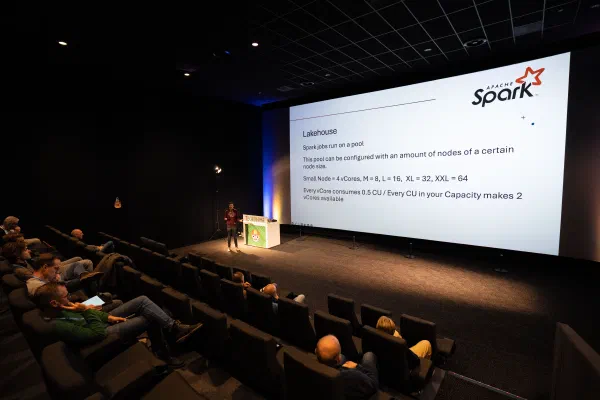
Lakehouse Spark jobs run on a pool This pool can be configured with an amount of nodes of a certain node size. Small Node = 4 vCores, M = 8, L = 16, XL = 32, XXL = 64 Every vCore consumes 0.5 CU / Every CU in your Capacity makes 2 vCores available By default, you run on a Starter Pool, node size M
Lakehouse: autoscale billing Capacity-level setting All Spark usage on Workspaces assigned to this Capacity would not consume regular CU Spark usage is billed separately Capacity itself still needs to be F2 or higher You can define the maximum CU for Spark jobs running on this Capacity Bursting and smoothing no longer applies
Lakehouse: autoscale billing
Data Warehouse and SQL Analytics Endpoints DW queries are distributed by the Distributed Query Processor over a certain amount of nodes Such an operation can burst (within milliseconds) to multiple nodes in a backend SQL pool Every node consumes a fixed amount of CU The user has no insights in how many nodes are used Not every operation needs to burst, sometimes the baseline available nodes suQice SKU size Baseline CU Burst factor F2 2 CU Up to 32x F4 4 CU Up to 16x F8 8 CU Up to 12x Any higher Capacity F? CU Up to 12x
Data Warehouse and SQL Analytics Endpoints DW operations are split between pure SELECT and other operations (analytical vs. ingestion) Maximum burstable capacity is split evenly between these two resource pools Private Preview, define your own custom SQL pools: https://aka.ms/CustomPools SQL Frontend Distributed Query Processor Analytical SQL Pool Baseline Nodes Burst Nodes (max 50%) Ingestion SQL Pool Baseline Nodes Burst Nodes (max 50%)
Data Warehouse: autoscale billing Currently in Private Preview: https://forms.office.com/r/TmU1TW3keD Can be set on Capacity-level or Workspace-level Instead of using CU directly from the Capacity assigned to your Workspace (still F2 or higher), DW uses a serverless pay-as-you- go billing model, billed separately You can define the maximum CU for the DW and SQL endpoint operations Bursting and smoothing no longer applies
Copilot Assigned a dedicated Capacity as Fabric Copilot Capacity (FCC) Moves the usage of Copilot out of regular Capacities assigned to Workspaces Removes unpredictability of users’ AI assistance needs on regular Capacities
Others CU usage for same amount of data processed: DataFlow Gen2 > Spark > DW You pay “extra” CUs for the ease of use. DW seems to have a strong CU benefit. DataFlow Gen2 (CI/CD enabled): < 10 min = 12 CU > 10min = 1.5 CU VNET Data Gateway: 4 CU per node … à https://learn.microsoft.com/en-us/fabric/enterprise/fabric-operations
Licensing
Throttling (and avoiding it)
Throttling
What do when throttled
What do when throttled
What do when throttled
What do when throttled
What do when throttled
What do when throttled
Cost optimization
Optimizing CUs usage and cost
Optimizing CUs usage and cost Reservations <> Capacities! Reservation : pool of available CU’s to be used in one or more Capacities E.g. Reservation of 64 CU’s: • 1x F64 • 2x F32 • 2x F16 + 1x F32 • 4x F4 + 2x F8 + 2x F16 ✅ Must do!
Optimizing CUs usage and cost Reservation <> max amount of CU’s 💡 HINT : Reserve what you’re using on a daily base Combine with PAYG for infrequent usage Create Logic App to auto-pause PAYG Capacity Resume PAYG when needed E.g. can even be through Fabric API from a Notebook in the Capacity using reserved CU’s
Optimizing CUs usage and cost Require Power BI Premium? PPU is still available! Price increase April 1 st 2025: $24 per month Move Power BI reports to separate Workspace(s) + activate PPU on these Workspace(s) Any F Capacity + Power BI Pro license = Power BI Premium (except for viewing by unlicensed users)
Monitoring
Capacity Metrics App Tips: Calculations are done in 30-second time windows This is a regular Power BI Report à You can use the filters to drill down Disadvantage: can only be viewed by Capacity Admin
Capacity Metrics App
FUAM
FUAM
Sam’s golden rules for Workspace & Capacity design
Questions? sam@debruyn.dev https://debruyn.dev https://debruyn.dev/tnl25
Stay in the loop
See you at the next one?
I announce upcoming talks on LinkedIn — that's also where most of the conference chatter happens. Slides and recordings land right here on the speaking page. If you'd rather follow along quietly, the RSS feed has every new post and talk.